
Align to a Reference Raster#
This tutorial demonstrates how to align rasters to a reference raster, ensuring the same extent, resolution, and projection. This is a common task when comparing or combining multiple raster datasets.

Aligning to a reference raster is straightforward. By passing the res (resolution) and crs (coordinate reference system) properties of the reference raster to the dataset being aligned during initialization, we can easily match the two. Next, sampling the dataset using the bounds of the reference raster ensures the data is aligned properly.
Here’s an example that aligns an amplitude product from an ALOS-2 image to a HyP3 image for comparison. The RasterDataset class can be used to handle these standard raster datasets.
Checking geospatial differences between two datasets#
from faninsar import datasets
from faninsar.constants import Resampling
import matplotlib.pyplot as plt
file_alos2 = "/Volumes/Data/Github/FanInSAR/tests/data/HyP3_ALOS2_Amplitude/ALOS2_phase.tif"
file_hyp3 = "/Volumes/Data/Github/FanInSAR/tests/data/HyP3_ALOS2_Amplitude/HyP3_Amplitude.tif"
ds_alos2 = datasets.RasterDataset(paths=[file_alos2])
ds_hyp3 = datasets.RasterDataset(paths=[file_hyp3])
arr_alos2  = ds_alos2[ds_alos2.bounds].boxes.data
arr_hyp3  = ds_hyp3[ds_hyp3.bounds].boxes.data
Loading  Files: 100%|██████████| 1/1 [00:00<00:00, 24.54 files/s]
Loading  Files: 100%|██████████| 1/1 [00:00<00:00, 257.35 files/s]
We can see that the ALOS-2 image has a different resolution, CRS and extent than the HyP3 image.
print(
    f"ALOS2 Dataset:\n"
    f"  CRS: {ds_alos2.crs}\n"
    f"  Resolution: {ds_alos2.res}\n"
    f"  Shape: {arr_alos2[0].shape}\n"
    f"  Bounds: {ds_alos2.bounds}\n"
)
print(
    f"HyP3 Dataset:\n"
    f"  CRS: {ds_hyp3.crs}\n"
    f"  Resolution: {ds_hyp3.res}\n"
    f"  Shape: {arr_hyp3[0].shape}\n"
    f"  Bounds: {ds_hyp3.bounds}\n"
)
ALOS2 Dataset:
  CRS: EPSG:4326
  Resolution: (0.0008333333333333334, 0.0008333333333333334)
  Shape: (762, 829)
  Bounds: BoundingBox(left=98.6675, bottom=38.45666666666667, right=99.35833333333333, top=39.09166666666667, crs=EPSG:4326)

HyP3 Dataset:
  CRS: EPSG:32647
  Resolution: (40.0, 40.0)
  Shape: (147, 97)
  Bounds: BoundingBox(left=488290.56541342364, bottom=4293071.467859996, right=492170.56541342364, top=4298951.467859996, crs=EPSG:32647)
kwargs = dict(cmap="RdBu", vmin=-120, vmax=120)

fig, axs = plt.subplots(1, 2, figsize=(10, 6), dpi=144)

ds_alos2.show(arr_alos2, ax=axs[0], title="ALOS2 Amplitude", **kwargs)
ds_hyp3.show(arr_hyp3, ax=axs[1], title="HyP3 Amplitude", **kwargs)

Aligning ALOS2 to the Reference HyP3 Image#
Aligning ALOS2 to a Reference Raster (HyP3) is straightforward: simply pass the res and crs properties from the HyP3 image to the ALOS2 dataset during initialization.
Additionally, we can specify the resampling algorithm for the alignment, which is defined in the faninsar.constants.Resampling enum, imported directly from rasterio. By default, the resampling method is set to Resampling.nearest, but alternatives such as Resampling.bilinear or Resampling.cubic can also be selected.
ds_alos2_aligned_nearest = datasets.RasterDataset(
    paths=[file_alos2],
    crs=ds_hyp3.crs,
    res=ds_hyp3.res,
)

ds_alos2_aligned_bilinear = datasets.RasterDataset(
    paths=[file_alos2],
    crs=ds_hyp3.crs,
    res=ds_hyp3.res,
    resampling=Resampling.bilinear,
)
arr_alos2_aligned_nearest = ds_alos2_aligned_nearest[ds_hyp3.bounds].boxes.data
arr_alos2_aligned_bilinear = ds_alos2_aligned_bilinear[ds_hyp3.bounds].boxes.data
Loading  Files: 100%|██████████| 1/1 [00:00<00:00, 182.91 files/s]
Loading  Files: 100%|██████████| 1/1 [00:00<00:00, 93.44 files/s]
print(
    f"shape of HyP3: {arr_hyp3.shape}\n"
    f"shape of ALOS2 Aligned (Nearest): {arr_alos2_aligned_nearest.shape}\n"
    f"shape of ALOS2 Aligned (Bilinear): {arr_alos2_aligned_bilinear.shape}\n"
)
shape of HyP3: (1, 147, 97)
shape of ALOS2 Aligned (Nearest): (1, 147, 97)
shape of ALOS2 Aligned (Bilinear): (1, 147, 97)
kwargs = dict(cmap="RdBu", vmin=-120, vmax=120)

fig, axs = plt.subplots(1, 3, figsize=(12, 6), dpi=144)

ds_alos2_aligned_nearest.show(arr_alos2_aligned_nearest, ax=axs[0], title="ALOS2 Aligned (Nearest)", **kwargs)
ds_alos2_aligned_bilinear.show(arr_alos2_aligned_bilinear, ax=axs[1], title="ALOS2 Aligned (Bilinear)", **kwargs)
ds_hyp3.show(arr_hyp3, ax=axs[2], title="HyP3", **kwargs)

plt.tight_layout()
plt.show()

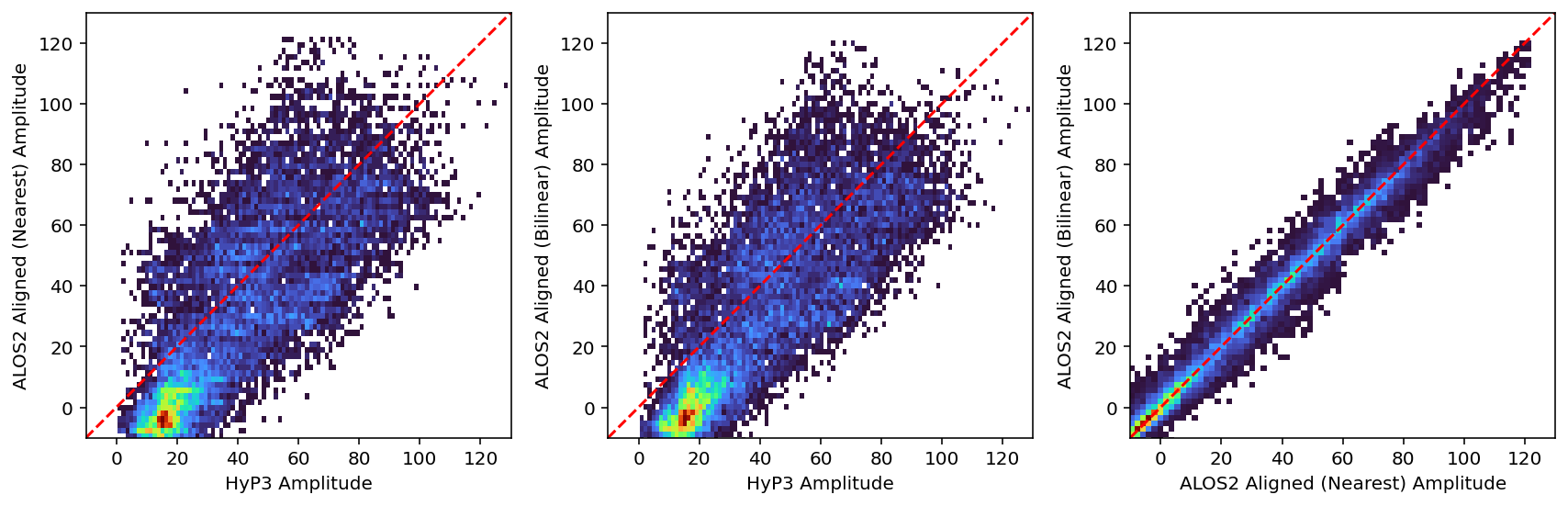
Now, we can directly compare the aligned ALOS2 image with the HyP3 image.
rng = [-10, 130]

def plot_hist2d(ax, x, y, xlabel, ylabel):
    ax.hist2d(x.flatten(), y.flatten(), bins=100, cmap='turbo', cmin=1)
    ax.set_xlim(rng)
    ax.set_ylim(rng)
    ax.set_xlabel(xlabel)
    ax.set_ylabel(ylabel)
    ax.plot(rng, rng, color="red", linestyle="--")
    ax.set_aspect("equal", adjustable="box")


fig, axs = plt.subplots(1, 3, figsize=(12, 4), dpi=144)

plot_hist2d(axs[0], arr_hyp3, arr_alos2_aligned_nearest, "HyP3 Amplitude", "ALOS2 Aligned (Nearest) Amplitude")
plot_hist2d(axs[1], arr_hyp3, arr_alos2_aligned_bilinear, "HyP3 Amplitude", "ALOS2 Aligned (Bilinear) Amplitude")
plot_hist2d(axs[2], arr_alos2_aligned_nearest, arr_alos2_aligned_bilinear, "ALOS2 Aligned (Nearest) Amplitude", "ALOS2 Aligned (Bilinear) Amplitude")

plt.tight_layout()
plt.show()
Save aligned ALOS2 images#
file_alos2_aligned_nearest = "/Volumes/Data/temp/FanInSAR/ALOS2_phase_aligned.tif"
file_alos2_aligned_bilinear = "/Volumes/Data/temp/FanInSAR/ALOS2_phase_aligned_bilinear.tif"

ds_hyp3.array2tiff(arr_alos2_aligned_nearest, file_alos2_aligned_nearest)
ds_hyp3.array2tiff(arr_alos2_aligned_bilinear, file_alos2_aligned_bilinear)
Verify saved aligned ALOS2 images#
ds_alos2_aligned_nearest_new = datasets.RasterDataset(paths=[file_alos2_aligned_nearest])
ds_alos2_aligned_bilinear_new = datasets.RasterDataset(paths=[file_alos2_aligned_bilinear])
print(
    f"ALOS2 Aligned (Nearest) Dataset:\n"
    f"  CRS: {ds_alos2_aligned_nearest_new.crs}\n"
    f"  Resolution: {ds_alos2_aligned_nearest_new.res}\n"
    f"  Shape: {arr_alos2_aligned_nearest[0].shape}\n"
    f"  Bounds: {ds_alos2_aligned_nearest_new.bounds}\n"
)
print(
    f"ALOS2 Aligned (Bilinear) Dataset:\n"
    f"  CRS: {ds_alos2_aligned_bilinear_new.crs}\n"
    f"  Resolution: {ds_alos2_aligned_bilinear_new.res}\n"
    f"  Shape: {arr_alos2_aligned_bilinear[0].shape}\n"
    f"  Bounds: {ds_alos2_aligned_bilinear_new.bounds}\n"
)
print(
    f"HyP3 Dataset:\n"
    f"  CRS: {ds_hyp3.crs}\n"
    f"  Resolution: {ds_hyp3.res}\n"
    f"  Shape: {arr_hyp3[0].shape}\n"
    f"  Bounds: {ds_hyp3.bounds}\n"
)
ALOS2 Aligned (Nearest) Dataset:
  CRS: EPSG:32647
  Resolution: (40.0, 40.0)
  Shape: (147, 97)
  Bounds: BoundingBox(left=488290.56541342364, bottom=4293071.467859996, right=492170.56541342364, top=4298951.467859996, crs=EPSG:32647)

ALOS2 Aligned (Bilinear) Dataset:
  CRS: EPSG:32647
  Resolution: (40.0, 40.0)
  Shape: (147, 97)
  Bounds: BoundingBox(left=488290.56541342364, bottom=4293071.467859996, right=492170.56541342364, top=4298951.467859996, crs=EPSG:32647)

HyP3 Dataset:
  CRS: EPSG:32647
  Resolution: (40.0, 40.0)
  Shape: (147, 97)
  Bounds: BoundingBox(left=488290.56541342364, bottom=4293071.467859996, right=492170.56541342364, top=4298951.467859996, crs=EPSG:32647)